I am a long time Rust player having played since the first days of the New (current) Rust after moving from the old H1Z1 survival game of the mid 2010s and while I am certainly no great PVP player I do really enjoy the atmosphere, mechanics and gameplay of Rust especially when you  have a few friends that you can relax with online, drop in to play after work or on a rainy weekend and have some fun times and laughs while talking about life and it’s great when the kids can get in on it too, however this can be a not-so-friendly game for kids sometimes.

I have experimented with hosting game servers for many games over the years especially since I also host LAN game days on occasion and while I did experiment with a Rust server for a while I always opted to join other established servers because managing a server can be a lot of work and at the time, my internet connection simply was not capable enough. 

So here is some info into this fun project for those interested… 

Can I Join and How?

This server is open to all respectful players that are into a more relaxed environment with les focus on raiding players. Raids are welcome in the last week of wipe but unless a player is inactive, should not be attempted on active players without some good natured reason. 

The server is Australia Based and will reject players with a high ping over 80ms so for most overseas players you will find you get rejected

For anyone else you can find the server in the Modded server list, just search for “JesterNet” 

You can also manually connect via the F1 console using command client.connect jestermgee-home.ddns.net:28015

For a full overview of all server features and rules see here:

>> JesterNet Rust Server Rules & Info <<

Why Host My Own Server?

While I love playing Rust I do also hate it just as much sometimes. Anyone who has played Rust will know what I mean.

Rust is a PVP/Survival game kind of like Minecraft but far more punishing. You gather resources and weapons, build a base and hope you don’t logon one day to find the whole thing raided and everything gone. Some will say that is part of the experience to try and survive a wipe and have done this many times but when you just want to enjoy a game a few nights a week with friends it can be difficult to compete with the young kids who live on the game for days at a time 

PVP is a big part of the game and some servers are focused purely on this aspect while other servers offer a full PVE experience with no player killing and a build experience but lack any real “danger” or random encounters. There are few servers that have a balance of both PVP/PVE and these lower population servers tend to be the most fun I have found especially when the people playing are decent gamers, sadly cheaters and toxic players are all too common. 

I have played a lot of custom servers and enjoyed many of the custom features over the years but have really struggled to find a server that offers the experience that I want and that friends of mine seem to enjoy so I set about designing my own server while having some friends help test mechanics and offer up suggestions. 

Another reason is I just enjoy the technical challenge of setting up a server, installing and modifying plugins and learning how to make it all work to offer an experience that is close to what the core game of Rust is but with additional features that make solo play just as fun. 

Designing & Deploying The Server

Having already setup servers for Rust, Minecraft, Half-Life and many other games in the past and having networking experience it wasn’t too difficult to deploy a Rust server and open it up to the internet. While the game of Rust is quite a huge game and graphically demanding, the server side is actually quite modest requiring just 16GB of RAM with a reasonable CPU, no GPU is needed for the server side at all. 

My Windows Server Specs: 
Windows 10, 24GB DDR4, i5 2.9Ghz

The initial setup guide I followed was from here: 

https://www.rustafied.com/how-to-host-your-own-rust-server

I started with setting up a standard “Vanilla” server locally and checked that I could access it and that the game ran fine and the server coped with it. In my initial test the game required about 20-30% CPU load to operate and did not seem to really move from this even with a few people connected so server load wise, it was fine likely for up to 30 people to play but i’d likely not allow more than 20. 

I then had to learn all the admin commands, setup a separate utility called RCON which allows management and monitoring of the server when not within the game so you can see who is playing online, what location they are from, steam details, in-game stats and the ability to ban or kick the players if needed. 

For the Admin Commands I refer to this site and it is also a requirement to know how to assign admin level to your Steam user ID 

https://www.corrosionhour.com/rust-admin-commands/


Modding The Game Server [Oxide Modding Platform]

While “Vanilla” Rust is fun to play there are a host of great plugins available that can improve gameplay on low population servers focused less on direct PVP gameplay and for this modding to work, a plugin manager is needed and there are 2 platforms that can be used for Rust, Oxide and Carbon. I was already familiar with Oxide which is the older platform that has a lot of great plugins. Carbon I believe is a newer platform that is a little more efficient and many plugins work on either platform but I stuck with what I already knew. 

Oxide is a simple install, download and copy the files to the Rust Server directory and then learn the “Oxide Permission” and console commands needed to allow plugins to work for users and you are set. 

Oxide can be downloaded free from here: 

https://umod.org/games/rust

Before downloading and installing hundreds of plugins, a clear idea of the goal of the server is needed and this is where experience with some of the available features becomes handy. For my server I wanted the following overall experience:

  • A Vanilla rust experience with some added functionality. While I wanted to add features and mods I wanted to keep the core of the gameplay close to how you normally play as I enjoy this aspect so no “instant crafting” or over supply of resources, just some QOL improvements and extra fun things for lower pop server play
  • Raidable bases which appear on the map players can attempt to raid. These are server created and take away that need to raid actual players a bit. 
  • More AI opponents. Rust has a few around the place but mostly it’s designed for other players to fight against. I wanted to add NPCs to the different monuments you can fight. 
  • Difficult challenges such as guarded crates or spawns of NPCs when you take on some of the events like how the Oil Rig event unfolds. 
  • Better Loot and less junk. This proves to be harder than I initially thought because balancing a good experience with finding loot Vs not overloading things too much is tough
  • Ownable vehicles is a feature I found on a server where you pay a high cost for a vehicle such as a mini copter but you own that for the whole server wipe and can respawn it any time even if you crash it. There are time limits after crashing and between respawning but it makes the gameplay so much more enjoyable
  • Improved gather and storage amounts by increasing some of the resource gathering to make it less of a grind and allowing for more resources to be stacked per slot in a container for better base management. 
  • Possibility of quests and fun activities.
  • Many small QOL improvements to the gameplay without taking too much away like preventing meat from burning when left cooking, extending workbench coverage throughout the whole base to allow crafting while working on your base, skippable nighttime option (via a vote) to allow for more effective gameplay, faster smelting and crafting of resources, not instant crafting just slightly increased for some things to lessen waiting around.
 
Many features are things I encountered on other servers and found to be very enjoyable so I used many of the features I encountered as a starter and built from there, with work ongoing. 

Selecting / Testing Plugins [Free Plugins]

Once Oxide is installed and working it is a simple case to install plugins and features for Rust, just find a plugin that has the feature you want, copy it to the plugin folder and the Rust compiler will simply load the plugin automatically and generate the required config files which you can then edit to setup the features you want. 

This is where it gets both interesting and in-depth since Rust is now a 10 year old game and some plugins are very old, not maintained, outdated in functionality or more common now, behind paywalls where much of the modders scene back in the day was open source and free for all to use, this began to change as players created their own modded and paywalled servers and started to profit off the work of others and now some plugins demand a higher cost than the actual game itself costs. 

There are still loads of great free plugins to add some decent features tho some of the larger and most desirable ones do have a cost involved. A good word of advice is to try keep plugins to a minimum and install and test one at a time because sometimes issues arise, some plugins need to be manually fixed and updated and some plugins can conflict with others so a lot of testing is needed. 

Free Plugins Installed

For free plugins you can get them here:  https://umod.org/plugins

The following is a list of free plugins I installed and the reason. I have marked these ad “admin” which means they are used only for admin or system reasons, “feature” meaning the plugin adds a new feature to the game and “qol” meaning the plugin modifies the gameplay for a better experience

  • Admin Panel / Admin Radar (admin): These 2 plugins create a quick access panel for admins and moderators to enable features to assist with admining a server such as showing where players and NPCs are on a map, location of stashes etc. This is basically an ESP suit of tools and should only be used by an admin  who needs to admin the server.
  • Anti Offline Raid (feature): Prevents people raiding your base when you logoff with 48 hour protection. Logging off will cause your base to become 100% unraidable after 10 minutes and slowly drop protection allowing raids to happen but at the cost of much greater resources. After 48 hours the protection wears of completely allowing abandoned bases to be raided. All a player needs to do is login every day for 15 minutes to keep their base protected rewarding players who maintain somee gameplay. 
  • Automatic Authorization (qol): Authorizes players who auth on the main Tool Cupboard on all door locks, locked crates and turrets for a base so they no longer have to enter codes on all your doors. Can be configured to not auth on boxes for instance so you can keep your goodies safe from team members.
  • Auto Pickup Barrel (qol): Causes your character to automatically pick-up loot from a barrel when you destroy it saving having to look around on the ground.
  • Better Loot (qol): This is explained in a lot more detail below but this is used in conjunction with the Looty Website to generate completely new loot tables or change how the loot system in the game works. It should be noted this can easily ruin the gameplay if you get loot distribution wrong.
  • Bradley Guards (feature): Will cause heavy guards to appear once Bradley takes on damage requiring a further gunfight and increasing the difficulty.
  • Building Workbench (qol): Simply extends the range of the workbenches throughout the entire base to allow crafting without having to stand next to a workbench.
  • Copy / Paste (admin): This is a required plugin for the “Raidable Bases” plugin to allow bases to be generated but is also used by admin (and approved users) to easily copy any base as a template and paste it back again. 
  • Crafting Controller (qol): Offers the ability to adjust the crafting times globally or per craftable item. Used to decrease craft times for some items
  • Discord Logger / Discord Report (admin): Allow integration of game and server messages to a discord channel.
  • Heli Control (qol): Allows adjustments over the Patrol Helicopter such as fire rate of the gun, how many rockets or fire missiles it shoots, the damage it can inflict and the speed it travels. Used in conjunction with some server commands to make the Heli less likely to flee when engaged and also to go down where you kill it instead of trying to flee to the closest monument
  • Inbound (qol): Shows messages in chat when Heli, Chinook, Bradley, Cargo or Oil Rig events start allowing players to prepare if they want to take them on. 
  • Info Panel (qol): A customisable OSD panel that is used in game to show the in-game time, how many players online/sleeping and if the Patrol Heli, Cargo Ship, Chinook Crate Drop and Bradley events are active and available on the map. 
  • Kits (feature): Allows admins to create player kits which can be redeemed using in-game currency or for free. Used currently to offer starter kits for players when they first start
  • Mini Copter Options (feature):  Allows for the addition of storage crates to the mini copter so players can carry items in their heli as well as setting an option to drop the items and the loaded fuel instead of it “burning up” when the heli is destroyed.
  • Monuments Recycler (qol): I would class this as a QOL addition as it doesn’t change gameplay much. This simply adds a recycler to the oil rigs and the cargo ship so players can recycle components when doing these missions. 
  • NPC Spawn (admin): This is just a controller plugin that is used by other plugins that can create NPCs but it is needed to use plugins such as SpawnNPC or RESpawnNPC.
  • Ping (admin): Detects players who join that have a high Ping and automatically kicks them from the game. Useful to allow only local (Australian) players to connect and play.
  • Quick Smelt (qol): Adjusts the timers for smelting different resources or globally along with the amounts given. Used to decrease smelting time by 2x.
  • Remover Tool (admin): Admin tool to remove any placed entity in the game. Used to assist in designing bases for raid base events. 
  • Sign Artist (qol): Allows images or text to be applied directly to signs and canvases. Use it as an admin to generate text signs but it is usable by players in game if they know how. 
  • Skip Night Vote (qol): Opens up a vote in chat allowing online players to vote to skip night as it gets dark. Since night can be too dark to do much it allows for more gameplay however sometimes it is nice to have night occur so looking into methods to allow it to only work sometimes. 
  • Sort Button (qol): Adds a simple sort button to containers allowing a container to be quick sorted by category of item or name of item
  • Stack Size Controller (qol): Allows adjusting the amount of components and items that can bee stacked in a single slot. Use this plugin to increase stack size globally by 2x while increasing some other items such as medpens and bandages by 6 allowing for more healing on the go. 
  • Timed Events (qol): Allows adjustment of the event times and how many people need to be online for the events to begin for the Patrol Heli, Cargo Ship, Chinook Drop, Air Drops, Oil Rig and Bradley events occur. For this server I make Cargo less often, about every 1.5 – 2 hours and Patrol Heli more often between 45mins and 1.5 hours with a chance that 2 patrol helis will spawn. 
  • Vehicle Licenses (feature): Creates a vehicle license system where players can purchase vehicles normally at the vendors or using the /buy command in chat. For this feature the cost of vehicles is quite high however once you purchase a vehicle it can be spawned anywhere any time allowing you to call your vehicle or respawn it when it is destroyed. This is such a useful plugin that all players love.     


That is most of the free plugins used on this server and the reasons I have installed them but there are a couple of paid plugins that offer some of the most fun features…

Raidable Bases [Free or Paid plugin]

This plugin started off years ago as a free plugin and is in fact still available as a free plugin however the developer has decided due to the size of this plugin feature and the work needed to maintain it the free version is now rather limited with all features needing the full paid version which is about $30USD

Raidable Bases is an event plugin with a HUGE amount of configuration that can add a lot of value to quite servers. The plugin uses the Copy / Paste plugin to deploy randomly bases around the map from pre-created templates that players can raid just as they would a real base. 

The free version allows just 1 difficulty level of raidable bases while the full version allows for multiple tiers of difficulty (easy, medium, hard, expert, extreme) where each tier would have a harder base to raid, more traps and more defending NPCs with custom tables of loot for each level offering huge payoffs for the harder bases and some smaller gains for easy bases. 

This can be a really good way to allow players to increase their loot and practice raid skills and for this server instead of using pre-created template bases I created a number of realistic base layouts with some bases created by friends and the plan is to simply copy some in-game designs from other players and use those as future raidable bases.

Well worth the cost of the plugin for players to enjoy and I have had a lot of fun on servers that have these as an option.
 

RESpawnNPC [Free or Paid plugin]

This is another plugin that started off and is still available as the Free “SpawnNPC Plugin which is no longer maintained but does work, just not as well as the newer version which is the Paid “RESpawnNPC” plugin. The new version has better NPC behaviour as well as an in-game accessible GUI menu to adjust the behaviour and number of NPCs at a monument. 

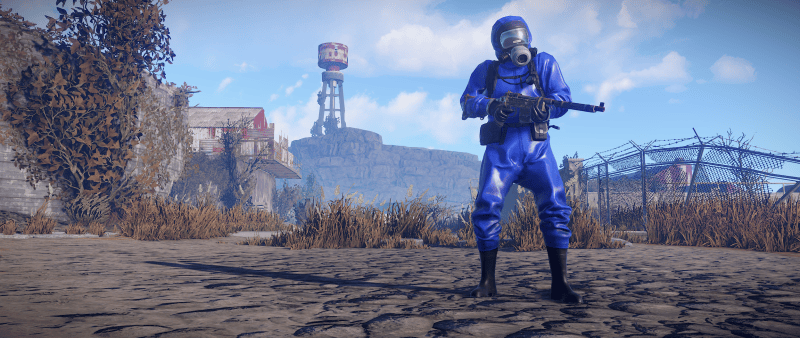
These plugins are highly configurable and allow for armed NPCs to be added to monuments around the map that patrol the area and hunt you down if you engage them. Unlike the standard NPCs in Rust that simply stand there or hide then come back out again, these react to your gunfighting and other NPCs in the area will begin to flank you and come after you. 

On this server I have setup for basic zombie style of NPCs at basic monuments like supermarket and gas station that just run at you with a knife or chainsaw and are easy  to kill with a bow. Other monuments have a mix of scientists with pistols, SMGs and shotguns while the higher tier monuments such as Launch Site and Missile Silo will have some heavier scientists carrying mini guns and sniper rifles. 

This not only adds some extra challenge and jump scares to quiet servers but also makes early game less easy to just enter into areas as a light geared player and wander around looking for higher tiered loot. Now you need to be armed and prepared to fight off NPCs and get out before the come back. 

Better Loot + Looty [Free]

One of the last really big overhauls of the game is a free plugin called Better Loot which completely redefines how the loot system in Rust works and can be used to easily modify what every loot container (box, barrel, NPCs) drops. 

This plugin alone is not all that useful and simply installs and manages the system, the real work is done within the Looty Online Editor which is used to create and edit container loot tables, profiles and set the probability for loot to be found within containers. 

While this seems great on the surface it requires a hugely in-depth knowledge on the whole Rust loot system and what you would usually expect to find. I would recommend first finding an existing template that works just like Vanilla rust then experimenting from there as I have played on some servers where it is clear the intention of the server owner to improve some things but ends up often resulting in people finding huge amounts of weapons and explosives too easily

I won’t dive into how I have setup the loot on this server too much as that will take away some of the mystery but the whole idea of adjusting the loot tables is to remove some of the garbage from loot crates and barrels such as hemp clothes, hats and letter boxes etc while making finding green boxes and military crates rewarding with less chance of garbage. 

It is an ongoing process to adjust these tables but currently there are over 40 separate profiles which mix into various containers to control what loot is dropped and add some loot that often doesn’t drop such as basic teas


Final Thoughts & Plans

This whole project was mostly just for fun and to create a world myself and my friends and family could play in without fear of abusive or toxic players and it would be enjoyable for others to join the fun too but time will tell if I keep it running as managing a server can be time consuming and I always have a lot of other projects to get into. 

There are certainly improvements and features I want to add such as an upgraded Cargo Ship event with more guards, quest system and more custom events however many of these extra events are paid plugins and initially I need to test the current server environment runs well enough before adding more. 


Donate

If you ahve enjoyed this info or have played and wish to support the server so I can implement better features for all, please feel free to donate below.